
Trial lessons that book themselves, on your own website
A visitor picks an instrument and a free slot with a teacher. Musicdott sends the confirmation, the reminder and the follow-up email, then sets up a call for you.
A request is not yet an appointment
At many music schools, a trial lesson request still arrives by email or through a contact form. Then the back-and-forth starts: when can you come, with which teacher, for which instrument? Someone who asks on a Tuesday evening sometimes only hears back after the weekend, and may have booked somewhere else by then.
With the Manager add-on, a visitor books the trial lesson themselves, at a time that is actually free. You see the booking come in and teach the lesson.
How it works, from booking to enrolment
- 1
The visitor picks an instrument and a free slot
The free slots come from the availability you set per teacher, minus the lessons already in the timetable. Two people can never book the same slot.
- 2
Confirmation with a cancel link
After booking, the visitor gets a confirmation email with a link to cancel the trial lesson themselves. The booking goes on your waiting list, not among your students.
- 3
A reminder beforehand
Before the trial lesson, the visitor automatically gets a reminder. If you would rather not send it, you switch it off for your school.
- 4
"How was it?" and a call to make
Afterwards the visitor gets a "how was it?" email, and a call is waiting for you. No answer? Mark it "no answer" and it comes back tomorrow.
- 5
Enrol in one step
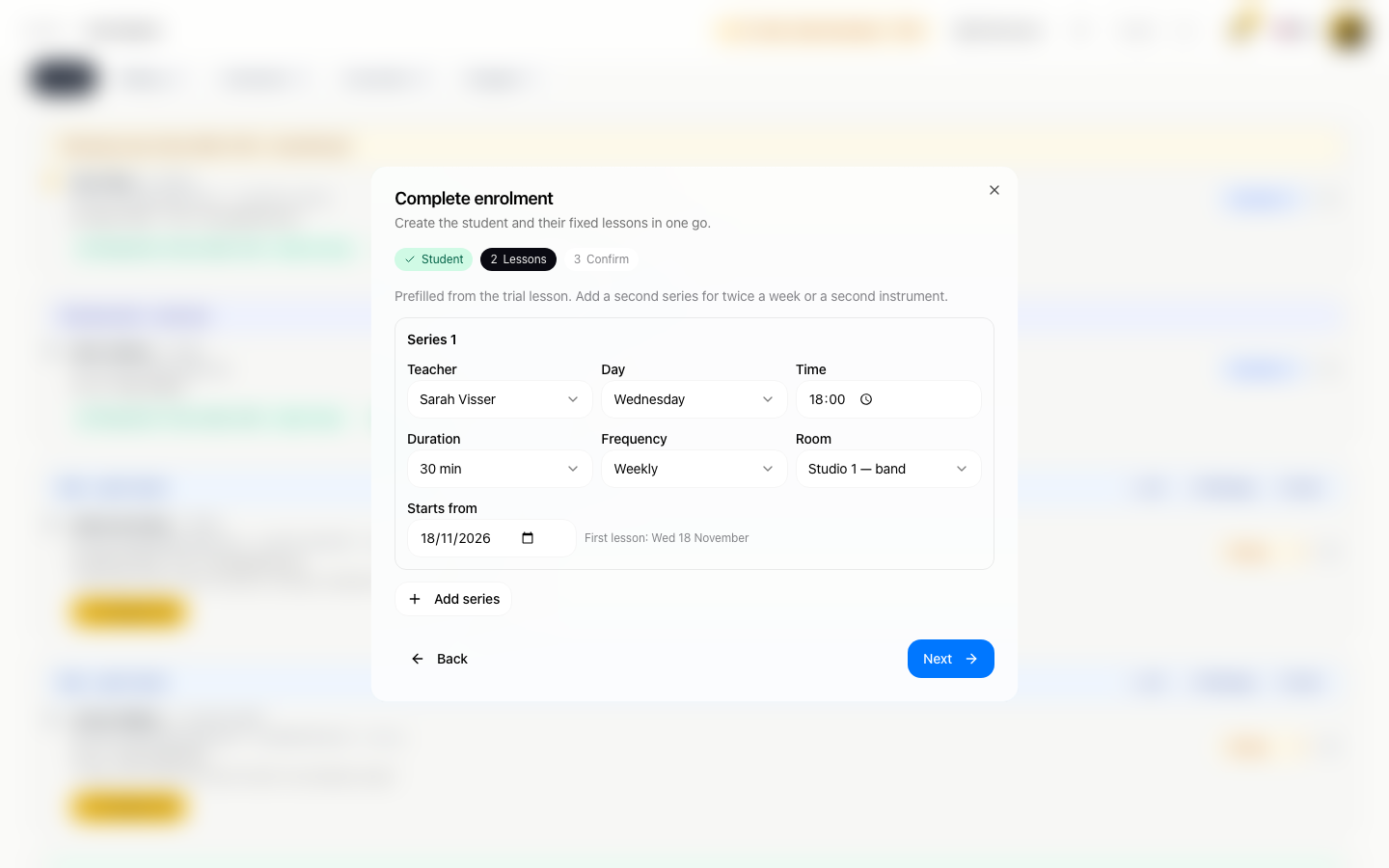
If it is a yes, the enrolment wizard creates the student and the recurring lesson series in one go, already filled in with the teacher, day and time of the trial lesson.
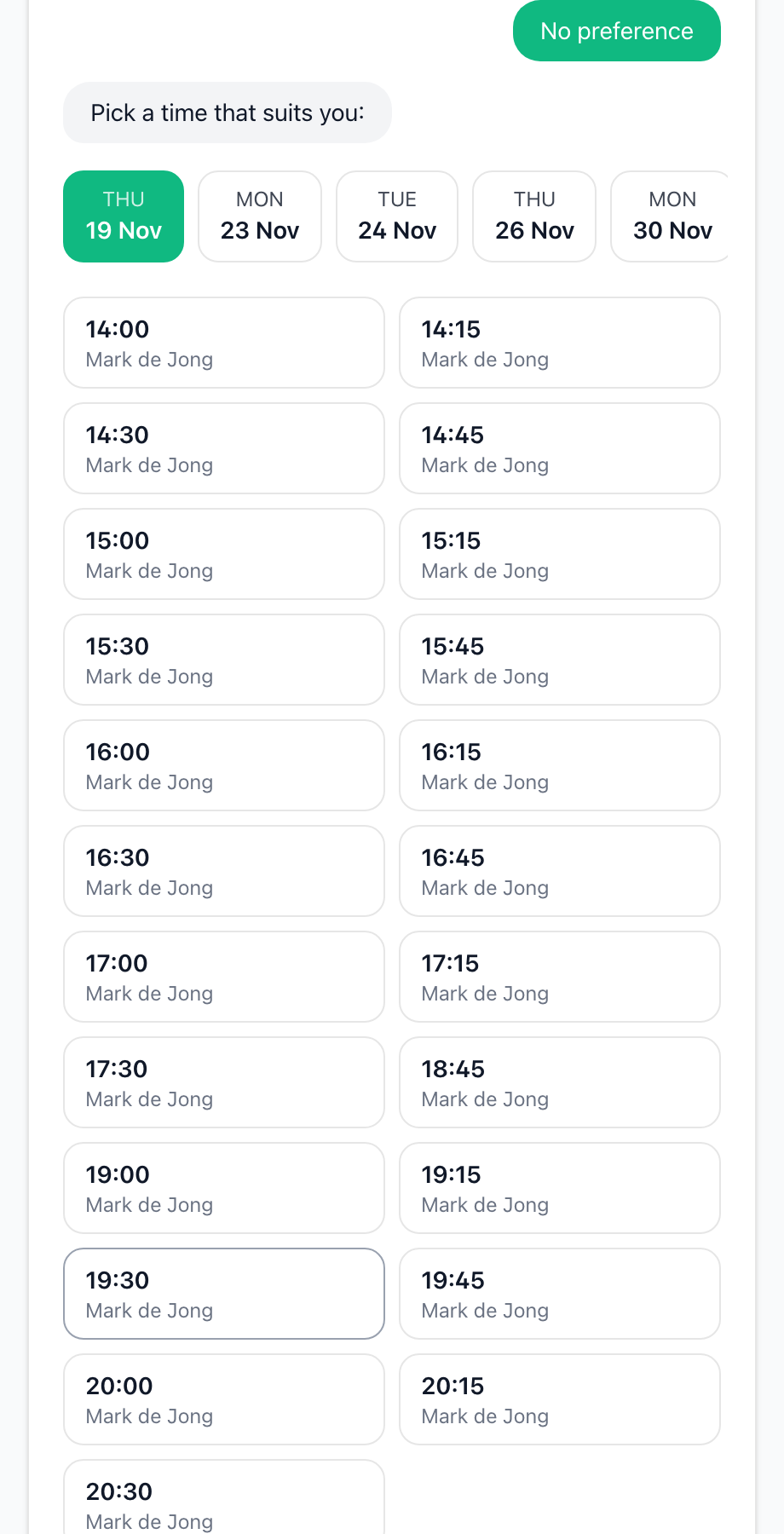
Where visitors book
You choose where the trial-lesson flow appears. The free slots and the bookings are the same everywhere.
On your existing website
One line of code puts the flow on your own site, as a block on the page or as a pop-up behind a button. You don't have to replace your website.
In a Sitebuilder site
No website yet, or ready for a new one? A site you make with Sitebuilder has the trial-lesson section built in. Without Manager, a contact form appears in that spot.
On your own booking page
You also get a booking page on Musicdott to link to from social media or a newsletter. See the demo school's page.
After the trial lesson
Enquiries
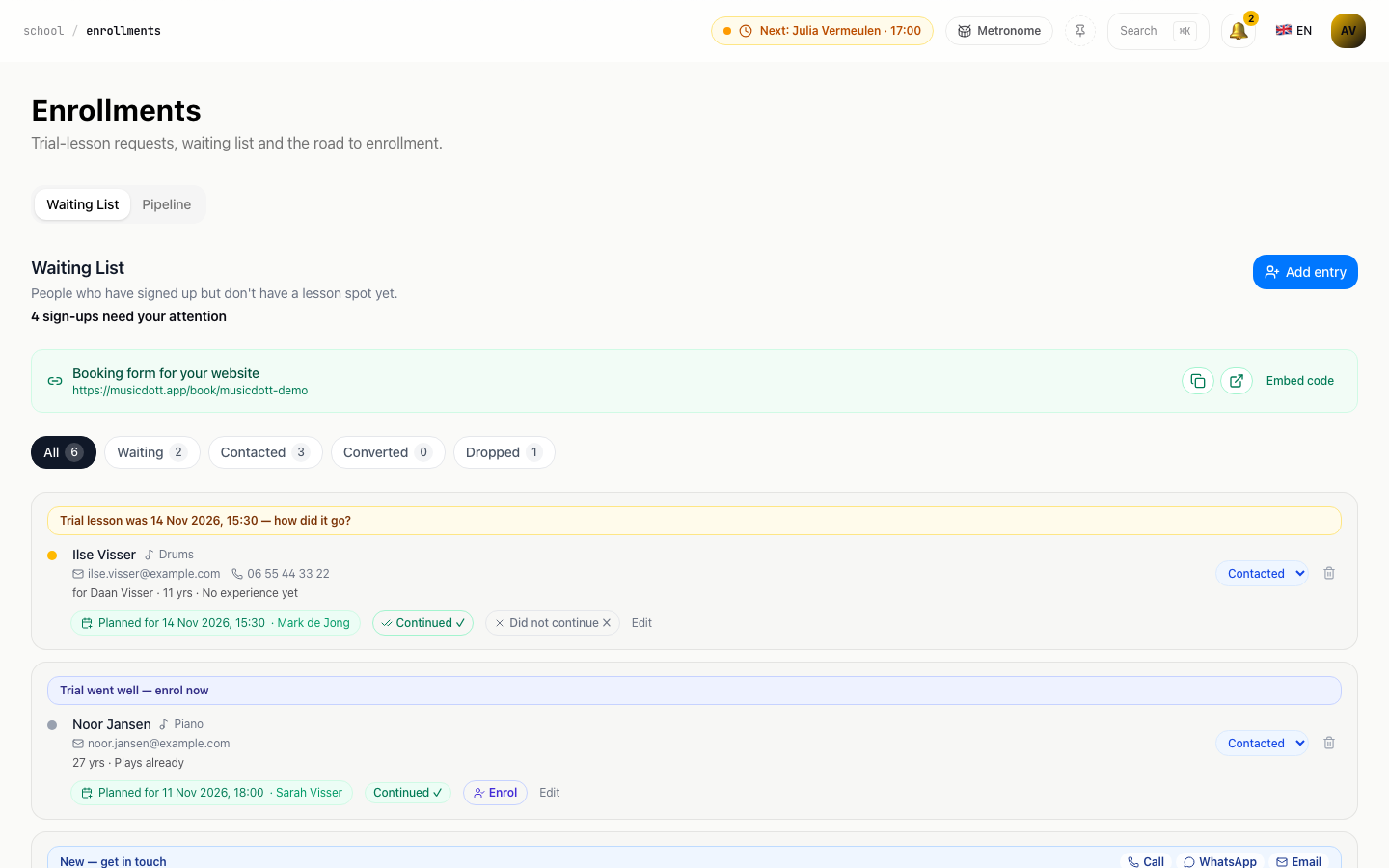
Every enquiry in one place, with one next step
Booked trial lessons, the waiting list and everyone still deciding after a trial lesson sit in one list. Each card shows what needs to happen now: call, plan a trial lesson, record the outcome or enrol.
- Call, WhatsApp or email straight from the card
- Plan a trial lesson yourself, with a warning if the slot is taken
- Pipeline: see at a glance where everyone stands
Enrolment
From trial lesson to student in three steps
The enrolment wizard creates the student and their recurring lesson series in one go. Teacher, day and time are already filled in from the trial lesson.
- When a parent signs up a child, the child becomes the student and the parent the contact
- Up to four recurring lessons per student, weekly or every other week
- You see the date of the first lesson before you confirm
What does it cost?
€9.95 per month, excl. VAT
Online trial lesson booking is part of the Manager add-on, on top of your Musicdott plan. You can try Manager free for 14 days first, also during your free first month. You start the trial yourself in the app, without payment details, and it stops by itself.
Add Sitebuilder and you pay €16.95 per month for both. Manager also handles follow-ups, teacher hours and lesson-fee tracking: it is all on the Manager page. All plans are on the pricing page.
Frequently asked questions
Do I need a new website to take trial lesson bookings online?+
No. You paste one line of code into your existing website, as a block on a page or as a pop-up behind a button. Without a website, you link to your own booking page on Musicdott, or you make a site with Sitebuilder, which has the trial-lesson section built in.
Can a visitor book a slot that is already taken?+
No. The free slots come from your teachers' availability, minus the lessons already in the timetable. Two people can never book the same slot.
Does a booked trial lesson count as a student in my plan?+
No. A trial lesson sits on your waiting list, not among your students. Only when you enrol someone after the trial lesson do they become a student.
Can I switch off the reminder and the follow-up email?+
Yes. You switch the reminder before the trial lesson and the "how was it?" email afterwards on or off for your school.
What does online trial lesson booking cost?+
It is part of the Manager add-on: €9.95 per month excl. VAT, on top of your Musicdott plan. You can try Manager free for 14 days, without payment details. The trial stops by itself.